Using GitHub Enterprise Apps for Programmatic App Management Across Orgs
A comprehensive guide to using Enterprise GitHub Apps to programmatically install and manage applications across all organizations in your GitHub Enterprise
Overview
GitHub has made enterprise GitHub App management much easier with the general availability of Enterprise GitHub Apps and Enterprise-level access for GitHub Apps and installation automation APIs (public preview). These capabilities allow enterprise administrators to programmatically install, manage, and audit GitHub Apps across hundreds of organizations without manually clicking through installation screens. This is particularly useful during migration scenarios where you need to programmatically install and configure apps across multiple organizations.
As of May 2026, there’s also a new enterprise installation API (public preview) that lets an App look up its own enterprise installation ID via GET /enterprises/{enterprise}/installation instead of grabbing it from the browser. In August 2026, GitHub also added an enterprise billing permission so Apps can access usage data and manage budgets and cost centers without relying on a personal access token.
This post shows how to use these new APIs with practical bash examples.
Check out my Demystifying GitHub Apps: Using GitHub Apps to Replace Service Accounts post if you’re interested in learning more about what a GitHub App is! 🚀
What Are Enterprise GitHub Apps?
Enterprise GitHub Apps are GitHub Apps owned by an enterprise account instead of an individual user or organization. Enterprise ownership gives enterprise owners a central place to create, manage, and transfer Apps used across their organizations.
The March 2025 GA release made this ownership model generally available. Existing organization-owned Apps can be transferred to the enterprise, and permission updates are automatically accepted by organizations where the App is installed. This removes much of the organization-by-organization administration required for Apps used across a large enterprise.
Enterprise ownership alone does not grant an App access to enterprise resources. The App must also be installed on the enterprise and granted the appropriate enterprise permissions.
Enterprise App Permission Scopes & Capabilities
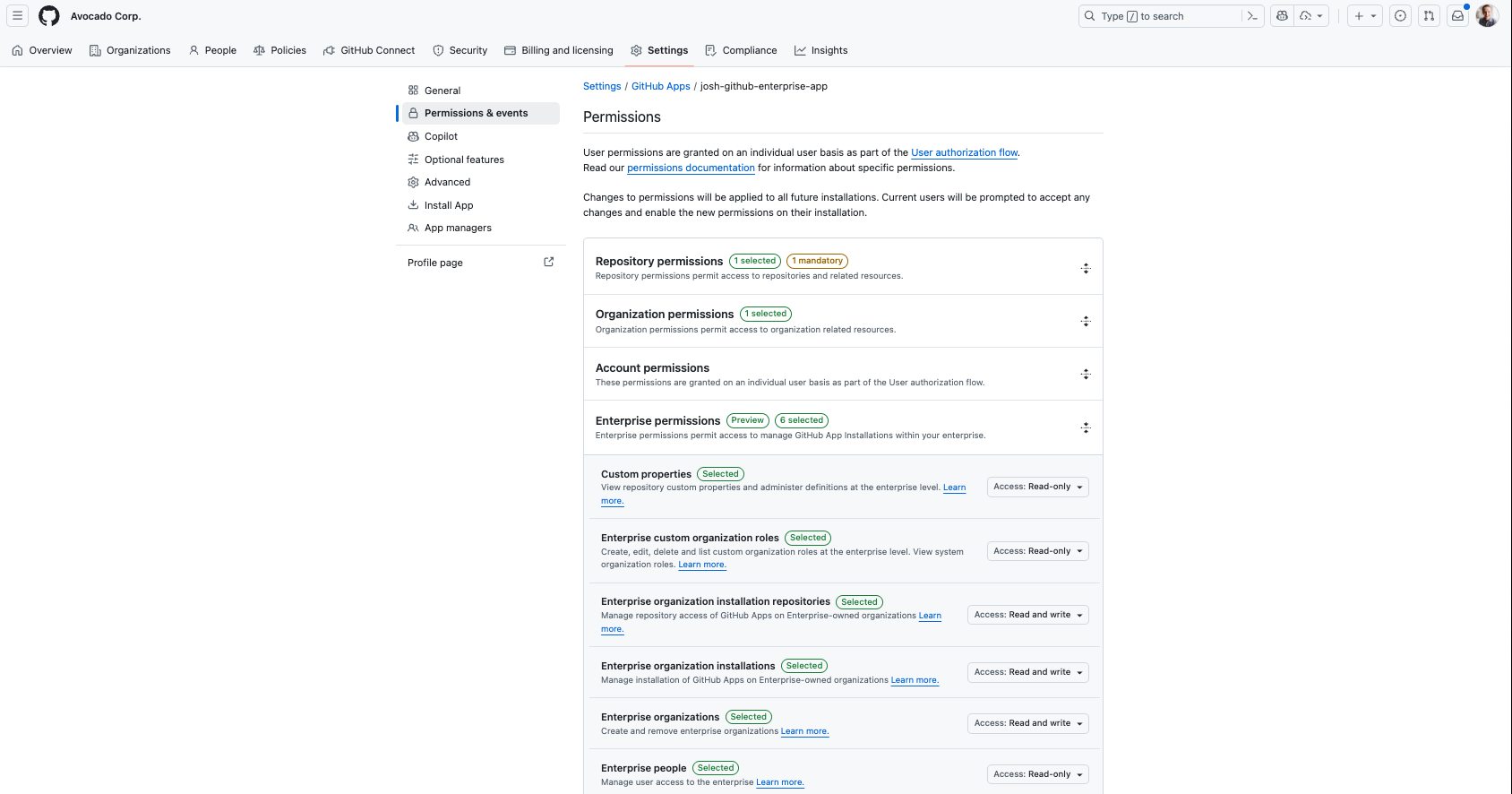
The available permissions now extend well beyond App installation management. The following tree groups them by the enterprise resources they control:
1
2
3
4
5
6
7
8
9
10
11
12
13
14
15
16
17
18
19
20
21
22
23
24
25
Enterprise permissions
├── Billing
│   └── Enterprise billing (view usage or manage budgets and cost centers)
├── Copilot and AI
│   ├── Copilot usage records (view API usage records)
│   ├── Enterprise Copilot metrics (view Copilot metrics)
│   └── Enterprise AI controls (manage enterprise-wide AI controls)
├── Roles and access
│   ├── Custom enterprise roles (manage roles and assignments)
│   ├── Enterprise custom organization roles (manage organization roles)
│   ├── Enterprise people (manage user access)
│   ├── Enterprise teams (manage enterprise teams)
│   └── Enterprise single sign-on (view and manage SSO configuration)
├── Properties and security
│   ├── Custom properties (manage repository property definitions)
│   ├── Enterprise custom properties for organizations
│   ├── Enterprise credentials (view and manage credentials)
│   └── Enterprise innersource vulnerabilities
├── Enterprise administration
│   └── Enterprise organizations (create and remove organizations)
└── GitHub App installation management
    ├── Enterprise organization installations (install or uninstall Apps)
    └── Enterprise organization installation repositories
        ├── Change access between all and selected repositories
        └── Add or remove repositories from an App installation
GitHub maintains the endpoint-level details for each scope in the enterprise permissions reference.
Requesting either Enterprise organization installation repositories or Enterprise organization installations prevents the App from being installed on other enterprises.
Enterprise Billing API Access
Enterprise owners can grant a GitHub App the Enterprise billing permission with either read or read and write access. An installation access token carrying this permission can call the enterprise billing REST API to:
- Pull usage data into finance or business intelligence systems
- Reconcile invoices
- Manage budgets and cost centers with read and write access
Before this permission was introduced, billing API automation required a personal access token belonging to an enterprise owner or billing manager. Using an App installation access token removes that dependency on an individual and provides higher rate limits than a personal access token.
The enterprise billing permission is available on GitHub Enterprise Cloud.
Installation Automation API Examples
The examples in this post use the Enterprise organization installations and Enterprise organization installation repositories permissions with the enterprise-level access and installation automation APIs. Together, they allow an App to:
- Install or uninstall GitHub Apps across enterprise-owned organizations
- Audit which Apps are installed and which repositories they can access
- Add or remove repositories from an App installation
- Change an installation between all repositories and selected repositories
You can use an Enterprise-owned GitHub App to install another Enterprise-owned GitHub App into an organization, an organization-owned GitHub App, or even a third-party Marketplace app into an organization. The key difference is that the Enterprise-owned App has enterprise-level permissions and can be managed centrally by enterprise owners. See my post on installing Marketplace apps with Enterprise Apps for a walkthrough.
Previously, installing an App still required someone to complete the web flow. Repository access could be changed through an organization-level API, but it required a classic PAT and could not change an installation between all and selected repositories. Auditing an App’s repository access also required authenticating with the App’s JWT, querying each organization installation, and inspecting its repository_selection value. The enterprise-level APIs make this workflow programmatic and centrally accessible.
Before diving into the examples, there are a few important things to know:
- Prerequisites: You’ll need enterprise owner access (or delegated app manager permissions), and an Enterprise GitHub App with write access for both Enterprise organization installations and Enterprise organization installation repositories. You’ll also need to generate and safeguard the App’s private key.
- Authentication: In my examples, I’m using the
gh tokenCLI command to generate a token for App authentication. You can also generate your own JWT and App installation token using your preferred method. - API Documentation: There are two different sets of API endpoints for Apps, and navigating the documentation can be tricky. We’ll be using the REST API for managing organization GitHub App installations for Enterprise Administration, not the regular REST API endpoints for GitHub Apps (which are app and org-based, not enterprise).
Examples (Bash)
Need to look up your enterprise installation ID first? With the new enterprise installation API (public preview), you can grab it with a JWT instead of digging through the browser address bar:
1
2
3
4
5
# Mint a JWT for the app (no --installation-id needed)
jwt=$(gh token generate --app-id 1891481 --key /Users/joshjohanning/Downloads/josh-github-enterprise-app.2025-09-03.private-key.pem --token-only)

# Look up the enterprise installation ID
GH_TOKEN=$jwt gh api /enterprises/avocado-corp/installation --jq '.id'
If the App’s first installation was at the enterprise (no orgs), you can skip the
--installation-idflag entirely ongh token generate. Otherwise, the new API above is the cleanest way to discover it programmatically.
Now the full set of examples for managing app installations across enterprise organizations:
1
2
3
4
5
6
7
8
9
10
11
12
13
14
15
16
17
18
19
20
21
22
23
24
25
26
27
28
29
30
31
32
33
34
35
36
37
38
39
40
41
42
43
44
45
46
# Generate token for the enterprise app
# The --installation-id option can be omitted if the App's first installation was at the enterprise (no orgs)
# Otherwise, look it up programmatically with the new enterprise installation API (see above), or grab it from the address bar
token=$(gh token generate --app-id 1891481 --installation-id 84179086 --key /Users/joshjohanning/Downloads/josh-github-enterprise-app.2025-09-03.private-key.pem --token-only)

# Get repositories accessible to an app installed in org
# This effectively shows which repos the app is installed on
GH_TOKEN=$token gh api /enterprises/avocado-corp/apps/organizations/joshjohanning-org/installations/45357471/repositories --paginate --jq '.[].full_name'

# Get repositories belonging to an enterprise-owned organization
# Useful to know WHICH repos are available to install the app on
# or compare with the previous API to see which repos the app is NOT installed on
GH_TOKEN=$token gh api /enterprises/avocado-corp/apps/installable_organizations/joshjohanning-org/accessible_repositories --jq '.[].full_name' --paginate

# Flip to "selected repositories" for app installed in org
# Note this fails with `422` if you select invalid repos
GH_TOKEN=$token gh api --method PATCH /enterprises/avocado-corp/apps/organizations/joshjohanning-org/installations/45357471/repositories --input - <<< '{
  "repository_selection": "selected",
  "repositories": [
    "issueops-samples",
    "reusable-workflows"
  ]
}'

# Flip back to "all repos" for app installed in org
GH_TOKEN=$token gh api --method PATCH /enterprises/avocado-corp/apps/organizations/joshjohanning-org/installations/45357471/repositories --input - <<< '{
  "repository_selection": "all"
}'

# Uninstall app in an org
GH_TOKEN=$token gh api --method DELETE /enterprises/avocado-corp/apps/organizations/joshjohanning-org/installations/45357471

# You need to retrieve the client_id of the app being installed in order to install it
# The easiest way is to grab the app's client_id from the app's settings page
# Programmatically:
# - If the app is public, you can query the client_id with any authentication (including Enterprise GitHub App)
# - If the app is private, you can query the client_id using the API with your user token with the scopes:
#     $ gh auth login -s read:enterprise or gh auth login -s read:org
#     $ gh api /apps/josh-github-enterprise-app-disc --jq .client_id

# Install app in an org
# Note it needs client_id and not the app_id
GH_TOKEN=$token gh api --method POST /enterprises/avocado-corp/apps/organizations/joshjohanning-org/installations -f 'client_id=Iv1.1051aca2d4910a24' -f 'repository_selection=all'

# List all apps and their permissions in an organization
GH_TOKEN=$token gh api /enterprises/avocado-corp/apps/organizations/joshjohanning-org/installations --paginate
Current Limitations
As of September 2026, there are some limitations to be aware of:
- Limited permission scope: Not every enterprise capability has a corresponding GitHub App permission yet
- Enterprise webhooks: Enterprise installations cannot subscribe to webhooks yet
Third-party apps: Enterprises can only install apps owned by the enterprise or organizations within the enterprise– This works! You just need the app’sclient_id. See my post on installing Marketplace apps programmatically with Enterprise Apps for details.Enterprise installation discovery: Previously, there was no direct API to look up an enterprise installation ID - you had to paginate through all installations or grab it from the browser– Resolved in May 2026 withGET /enterprises/{enterprise}/installation(public preview)- Rate limits: Enterprise installations have their own 15,000 requests/hour budget - but note each installation still has its own rate limit
- Creating apps: You cannot currently create Apps through the API; I recommend using the manifest flow for codifying the app permissions and creation process through the UI
Keep an eye on the GitHub roadmap and changelog for updates on enterprise GitHub App capabilities.
Summary
Enterprise-owned GitHub Apps (GA March 2025), the Enterprise-level installation automation APIs (public preview July 2025), the enterprise installation API (public preview May 2026), and enterprise billing access continue to remove personal access token and manual administration dependencies. Apps can now manage installations across organizations and automate billing workflows with centrally controlled enterprise permissions.
The bash examples above demonstrate the core operations: install, uninstall, change repository access, and audit existing installations. These Enterprise-level GitHub App management APIs are particularly valuable during migrations or when you need to deploy security/compliance apps enterprise-wide.
Happy automating! 🔑 🚀