Everything you can do with .github and .github-private repositories
A centralized reference for .github and .github-private repository features, including required files and visibility on GitHub.com, GHEC, EMU, GHEC with data residency, and GHES
Overview
GitHub gives organizations two specially-named repositories - .github and .github-private - that act as the home for several org-wide defaults and features, including community profiles, default issue templates, starter workflows, and org-wide Copilot custom agents.
I wrote this because customers have asked if there is one centralized GitHub Docs page that lists every feature powered by these repositories. There are good docs for each individual feature, but not a single reference that answers, “What can I put in .github or .github-private, where does it go, and what visibility does the repo need?”
Each feature has its own required visibility, and those requirements differ between regular GitHub.com / GHEC, EMU (Enterprise Managed Users), GHEC with data residency, and GHES. If the repo has the wrong visibility, the feature usually just doesn’t apply.
This post collects the features that live in .github or .github-private, the files involved, and the repo visibility each one needs.
The Two Repositories at a Glance
The repos are typically used like this:
.github(typically public or internal) → community health files, public org profile README, GitHub Actions workflow templates, and org-scoped Copilot custom agents.github-private(typically private, sometimes internal) → member-only org profile README, Copilot custom agents, and enterprise-managed Copilot settings and plugin standards
For Copilot features, both repos can be valid depending on the feature and scope. For enterprise-level custom agent sharing across organizations, the docs still point to a designated .github-private repository.
Feature and visibility reference
| Feature | Repo | GitHub.com / GHEC | GHEC + EMU / GHEC-DR | GHES |
|---|---|---|---|---|
| Community health files (most) | .github | Public or Internal | Internal | Public or Internal |
| Org-wide issue / PR templates | .github | Public only | Not available | Public only |
| Public org profile README | .github | Public | Not available | Public |
| Member-only org profile README | .github-private | Private only | Private only | Private only |
| Workflow templates | .github | Public / Internal / Private | Internal only (private doesn’t serve templates) | Public / Internal / Private (≥ 3.21) |
| Copilot custom agents - org scope | .github or .github-private | Depends on selected repo | Internal or Private | Depends on selected repo |
| Copilot custom agents - enterprise scope | Designated .github-private repo | Internal or Private | Internal or Private | Internal or Private |
| Enterprise-managed Copilot settings and plugin standards | Designated .github-private repo | Internal or Private | Internal or Private | Not documented |
For Copilot rows that say “depends on selected repo,” use the visibility supported by that repo on your platform: .github follows .github visibility behavior, while .github-private supports internal or private for these Copilot use cases. For related files that do not work as org-wide defaults, see Copilot files that are not org-wide defaults.
Feature 1: Default Community Health Files
GitHub’s default community health files feature lets files in the org’s .github repo serve as org-wide defaults for any repo that doesn’t have its own copy. This is the original purpose of the .github repo.
Supported files
| File / Path | Purpose |
|---|---|
CODE_OF_CONDUCT.md | Community code of conduct |
CONTRIBUTING.md | Contribution guidelines |
GOVERNANCE.md | Project governance |
SECURITY.md | Security vulnerability reporting |
SUPPORT.md | Support resources |
FUNDING.yml | Sponsor button configuration |
.github/ISSUE_TEMPLATE/ (+ config.yml) | Issue templates and issue forms |
.github/PULL_REQUEST_TEMPLATE/ or pull_request_template.md | PR templates |
.github/DISCUSSION_TEMPLATE/*.yml | Discussion category forms |
Not supported as org defaults: LICENSE, CODEOWNERS, dependabot.yml. Those are per-repo only.
File location precedence (inside the .github repo)
GitHub searches in this order:
.github/folder- Root of the repo
docs/folder
The exception is issue templates, which must live in .github/ISSUE_TEMPLATE/.
Visibility requirements
| Platform | .github repo visibility | Notes |
|---|---|---|
| GitHub.com (free/pro/team) | Public | Only option |
| GHEC (non-EMU) | Public or Internal | Issue/PR templates require public |
| GHEC + EMU | Internal | Issue/PR templates don’t work at all (EMUs can’t have public repos) |
| GHES | Public or Internal | Issue/PR templates require public |
Issue and PR template visibility: Org-wide issue templates and PR templates always require a public
.githubrepository, even on GHEC and GHES. An internal.githubrepo will serve most other health files, but issue/PR templates silently won’t apply. Since EMU orgs currently can’t create public repos, EMU organizations cannot use org-wide issue/PR templates.
Issue template labels: If a default issue template assigns a label, that label must exist in both the
.githubrepo and the target repo where the template is used, or the template silently won’t apply it.
Feature 2: Public Organization Profile README
A public organization profile README is shown on your org profile page to people who are not members of the organization.
Setup
- Create a public
.githubrepo - Add
profile/README.mdto it - Supports full GitHub Flavored Markdown, emoji, images, GIFs
Visibility requirements
| Platform | .github repo visibility |
|---|---|
| GitHub.com / GHEC (non-EMU) | Public |
| GHEC + EMU | Not available (no public repos allowed) |
| GHES | Public |
The docs explicitly call this out: “Public organization profiles are not available with EMUs.”
Feature 3: Member-Only Organization Profile README
A member-only organization profile README is shown only to members of the org, on the member view of the profile page.
Setup
- Create a private repo named
.github-private(note: this is a different repo from.github) - Add
profile/README.mdto it
Visibility requirements
| Platform | .github-private repo visibility |
|---|---|
| All platforms | Private (confirmed - internal does not work) |
I actually tested this myself: if you flip .github-private from private to internal, the org member-only README disappears. For this feature, the repo must be private.
Feature 4: GitHub Actions Workflow Templates (Starter Workflows)
Workflow templates (starter workflows) let you publish reusable workflow templates that members of the org see when creating a new workflow in any repo.
Setup
Stored in .github/workflow-templates/ of the org’s .github repo. Each template needs two files:
your-template.yml- the workflow itselfyour-template.properties.json- metadata (name, description, icon, categories)
Visibility matrix
Templates “cascade down” - a more open .github repo can serve templates to more restrictive target repos:
.github repo visibility | Templates available to |
|---|---|
| Public | All repos (public, internal, private) |
| Internal | Internal and private repos only |
| Private | Private repos only |
Platform-specific behavior
| Platform | Notes |
|---|---|
| GitHub.com / GHEC (non-EMU) | Any visibility works (public, internal, private) |
| GHEC + EMU / GHE.com (data residency) | Internal only (see below) |
| GHES ≥ 3.21 | Any visibility works |
| GHES < 3.21 | Public only |
Starter workflows from non-public .github repos was a fairly recent change - see the September 2025 changelog for the announcement.
EMU / GHE.com workflow templates: On EMU and GHE.com (data residency), a private
.githubrepo does not serve workflow templates - even to other private repos in the org. The templates don’t appear in the “new workflow” picker. You need the.githubrepo to be internal. Since EMU/GHE.com can’t have public repos, internal is the only working option I found. This contradicts the documented cascade rules, which say a private.githubshould at least serve private repos, but that is not the behavior I observed on EMU/GHE.com.
The non-public workflow templates change applies only to GitHub Actions workflow templates. The changelog is explicit: “These changes only apply to GitHub Actions - other products that use
.githubrepositories (e.g., GitHub Issues) will continue to only use public.githubrepositories.” So issue/PR templates are still public-only.
Feature 5: Copilot Custom Agents (Org / Enterprise Scope)
Custom agents for Copilot (CLI and the Copilot coding agent) can be defined at user, repository, org, or enterprise scope. The org/enterprise-scoped versions live in either .github or .github-private, but the rules differ between org-shared and enterprise-shared agents.
Setup
Per the October 2025 changelog:
“By adding a configuration file under
.github/agentsin any repository or in theagentsfolder in the{org}/.githubor{org}/.github-privaterepository, you can define agent personas…”
So you have two valid locations: agents/AGENT-NAME.md in .github or in .github-private - but where you put them matters depending on whether you want org-scoped or enterprise-scoped sharing.
Agent file scoping reference
| Level | Location | Scope |
|---|---|---|
| User | ~/.copilot/agents/ | All projects for that user |
| Repository | .github/agents/AGENT-NAME.md | Current repo only |
| Organization | agents/AGENT-NAME.md in the org’s .github or .github-private | All repos in that org |
| Enterprise | agents/AGENT-NAME.md in .github-private of the org pointed to by enterprise config | All orgs in the enterprise |
Naming conflicts and precedence
Custom agents are resolved by filename. If the same agent filename exists at multiple scopes, the more specific scope wins:
1
user-level > repository-level > organization-level > enterprise-level
For example, if all four scopes define test-writer.md, Copilot uses the user-level test-writer.md. If there is no user-level copy, the repository-level one wins, then organization-level, then enterprise-level.
This is about duplicate agent filenames, not general instruction collisions. If different instruction sources all provide competing guidance, that can still be messy, but it is not the same deterministic custom-agent precedence rule.
Context note: Making an org or enterprise agent available does not mean the full contents of every shared agent are injected into every prompt. In practice, shared agents show up as available agent definitions/metadata, and the selected or invoked agent controls the behavior.
Org-scoped vs enterprise-scoped - confirmed by testing
Both .github and .github-private work for org-scoped agents (agents visible inside the org that owns the repo). I confirmed this on an EMU org: agents defined in both repos showed up in the same org.
For enterprise-scoped agents (where an enterprise admin points the enterprise Copilot config at a single org, and agents propagate to other orgs in the enterprise), the enterprise docs and UI point to .github-private as the configuration source:
“Configuration is sourced from
{org}/.github-private.”
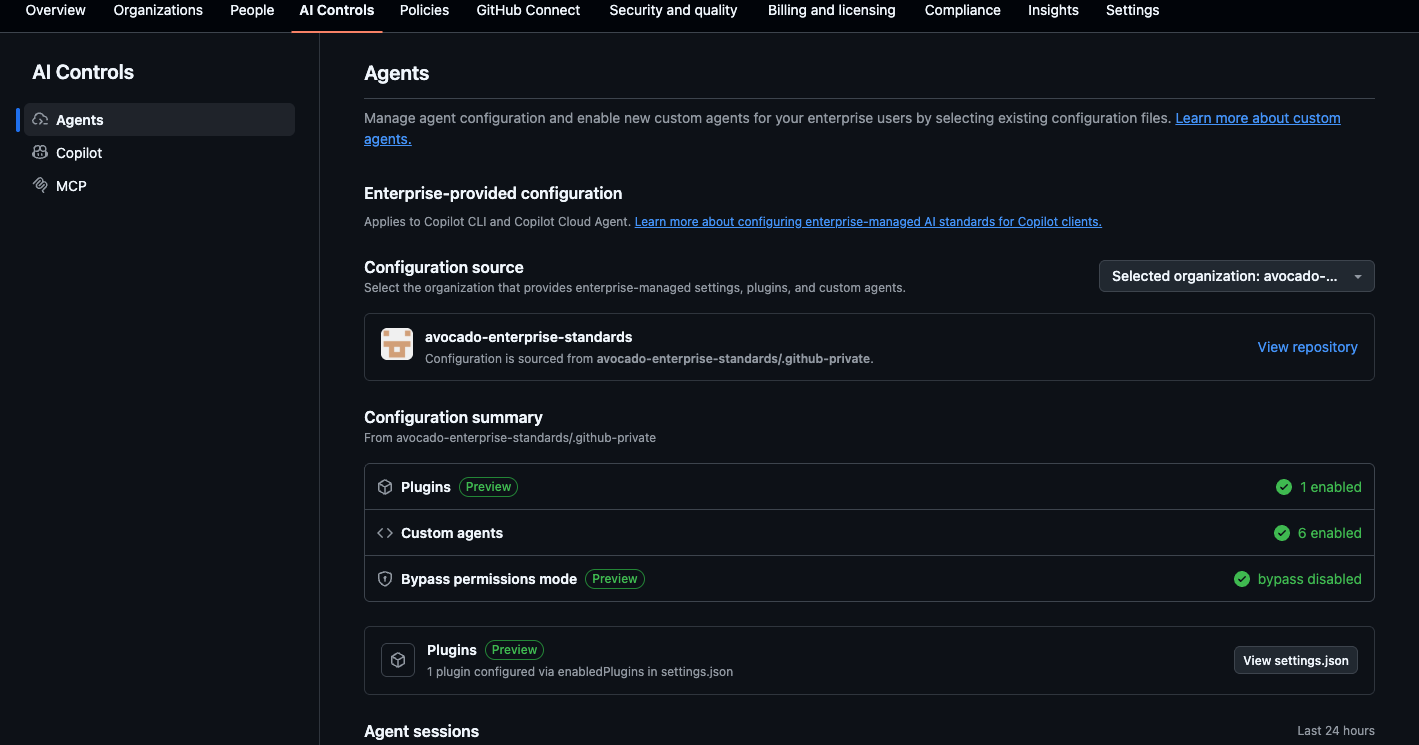 The enterprise Copilot Agents settings page shows
 .github-private as the configuration source
I tested this end-to-end: with an enterprise config pointing at an org that had agents in both .github and .github-private, only the .github-private agents (org-standards and test-writer in my case) showed up when viewing from a different org in the enterprise. Agents in .github of the same source org did not propagate enterprise-wide - they remained org-scoped.
Enterprise-scoped agents: If you want an agent to be visible to other orgs in your enterprise via the enterprise Copilot configuration, use the designated
.github-privaterepository. Agents in.githubstill work for org-scoped sharing.
This also lines up with the docs. The official prepare for custom agents and enterprise custom agents pages now document both .github and .github-private for org-scoped agents after a recent docs clarification. For enterprise propagation, the documented enterprise configuration source is still .github-private.
Visibility requirements
Visibility depends on which repo you use:
| Repo | Visibility behavior |
|---|---|
.github | Use the visibility supported for .github on your platform |
.github-private | Internal is recommended because it automatically grants read access to organization or enterprise members; private also works |
For enterprise-scoped agents, use the designated .github-private repository from the enterprise configuration.
Feature 6: Enterprise-managed Copilot settings and plugin standards
Enterprise-managed Copilot settings let enterprise owners centrally control Copilot client behavior. Server-managed settings are sourced from the designated .github-private repository in the organization selected as the enterprise’s source of governance.
These settings apply to all users on the enterprise’s Copilot plan, with no organization-level override. Users do not need access to the .github-private repository for the settings to apply. Supported clients currently include Copilot CLI, VS Code, the GitHub Copilot app, and Copilot cloud agent, although individual settings may not be supported by every client.
The available settings include:
- Permission controls, such as disabling bypass / allow-all mode
- Default model selection
- Required or blocked plugins
- Allowed or restricted plugin marketplaces
- OpenTelemetry export settings
- Remote control restrictions
A Copilot plugin can package agents, skills, hooks, prompts, MCP servers, and related metadata. The plugin settings provide enterprise governance over which marketplaces users can access and which plugins are automatically enabled or blocked. Users still need access to the repository or other source where a configured plugin is hosted.
Setup
- Select an organization as the enterprise’s configuration source under Enterprise settings → Copilot → Agents
- Create an internal or private
.github-privaterepository in that organization - Add
copilot/managed-settings.jsonto the repository’s default branch - Changes apply automatically within about an hour, or when a user restarts a supported client or signs in again
Visibility requirements
The designated .github-private repository can be internal or private. Visibility controls who can read or propose changes to the repository, not who receives the managed settings. Internal visibility grants enterprise members read access automatically, while private visibility lets you grant access manually.
Other deployment methods: The same managed settings schema can also be deployed through MDM or as a local file. Those methods do not use
.github-private, so this section focuses on the server-managed repository option.
What about copilot-instructions.md, AGENTS.md, skills, hooks, and prompts?
A common question - do any of these per-repo Copilot files work as org-wide defaults from .github or .github-private? Short answer: no. Org-level Copilot instructions do exist, but you define them in organization settings, not in either of these repositories.
| File / Folder | Scope | Notes |
|---|---|---|
.github/copilot-instructions.md | Per-repo | Lives in each individual repo |
.github/instructions/**/*.instructions.md | Per-repo (path-specific) | Modular instructions in each repo |
~/.copilot/copilot-instructions.md | Personal/global | User’s own machine |
AGENTS.md | Per-repo | Git root or cwd - repo-scoped instructions |
.github/skills/ | Per-repo | Skills for Copilot cloud agent, code review, CLI, app, and supported IDEs |
.github/hooks/ | Per-repo | Copilot hook definitions in the current repo |
.github/prompts/ | Per-repo | Reusable prompt files in the current repo |
.github/workflows/copilot-setup-steps.yml | Per-repo | Cloud agent environment setup |
| Repository settings → Copilot → MCP servers | Per-repo | Shared MCP configuration for Copilot cloud agent and code review |
You can store skills, hooks, or prompts in .github-private if you want a central repo for source control, but that does not make them automatically available across every repo. Add skills to .github/skills/ in each target repository for Copilot cloud agent and code review to discover them. MCP servers for those GitHub.com agents are also configured per target repository in its settings; existing Copilot cloud agent MCP configurations automatically apply to Copilot code review. For supported desktop/CLI clients, enterprise plugin standards can help install plugins so users get the right skills or tools locally, but that is a plugin/client policy flow - not an automatic .github-private repo lookup.
For org-level Copilot instructions, use the Org Settings UI → Copilot → Custom Instructions. There is no file-based equivalent in .github or .github-private. The docs currently describe org custom instructions as supported for Copilot Chat on GitHub.com, Copilot code review on GitHub.com, and Copilot coding agent on GitHub.com. In practice, we’ve also seen VS Code pick up org instructions for repos in that org, even though the docs do not clearly say that yet - so treat client support as something to test rather than assume.
Org custom instructions gotcha:
- They apply based on the organization that owns the repository you are working in, not necessarily the organization or enterprise that assigned your Copilot license.
- They are not file-based instructions, so they may not appear in logs or UI that are specifically showing instruction file discovery (
copilot-instructions.md,.instructions.md,AGENTS.md, etc.).- If you are testing whether org instructions apply, verify behavior directly or inspect the final assembled context/debug output when available; don’t rely only on file-discovery logs.
In contrast, the Copilot features that do use .github or .github-private directly are custom agents and enterprise-managed Copilot settings and plugin standards.
EMU / GHEC-DR limitations
As of this writing, if you’re on EMU or GHEC with data residency (GHE.com), these features are not available because they require a public repo:
- Public org profile README
- Org-wide issue templates
- Org-wide PR templates
- Org-wide discussion templates
One additional workflow template behavior to be aware of:
- Workflow templates need the
.githubrepo to be internal - on EMU/GHEC-DR, a private.githubrepo did not serve workflow templates, even to private repos. This differs from the documented cascade rules, which suggest private should work for private repos.
Everything else (community health files like CONTRIBUTING.md/SECURITY.md/SUPPORT.md, workflow templates from an internal .github, Copilot custom agents, member-only README) still works.
Summary
The .github and .github-private repos are used by several org-wide GitHub features, but the required repo, path, and visibility depend on the feature. The two practical takeaways:
.githubvs.github-privateis mostly a clean split: community health files, public README, and workflow templates live in.github. Member-only README and enterprise-managed Copilot settings live in.github-private. Copilot custom agents can use either repo at organization scope, but enterprise-wide agents and managed settings use the designated.github-privaterepository.- Visibility rules are feature-specific: issue/PR templates still require public, the member-only README requires private, and Copilot features can use internal visibility when hosted from
.github-private.
If you’re on EMU, the public-only requirements for issue/PR templates and the public org README are current product limitations. For issue and PR templates, the workaround is to manage them per-repo.