Syncing GitHub Repositories Between Environments in Bulk
A GitHub Action to mirror clone repositories between GitHub environments (GitHub.com, EMU, and GitHub Enterprise Server) with support for visibility control, Actions disabling, and archiving
Overview
If you work across multiple GitHub environments - like GitHub.com, GitHub Enterprise Server, Enterprise Managed User (EMU), or Data Residency (DR) - you’ve probably had to figure out how to keep repositories in sync between them. Maybe you’re migrating to EMU and need to keep repos mirrored during the transition. Or your company wants to mirror public actions repositories internally so teams can control the update cadence. Or you simply have a private working-copy repository that syncs to a public read-only repository for distribution and deployment.
I built the bulk-github-repo-sync-action (GitHub Marketplace) to handle this. It’s a GitHub Action that mirror clones repositories from a source to a target organization, automatically creating target repos if they don’t exist. It works across GitHub.com, GitHub Enterprise Server, EMU, and DR environments.
See my GitHub Migration Tools Collection post for more migration-related tools and scripts.
Use Cases
There are a couple of scenarios where I’ve found this useful:
Syncing Between GitHub Environments
This is the primary use case. If you’re running GitHub Enterprise Server alongside GitHub.com, or migrating from a regular org to an EMU org, you may need to keep certain repos mirrored between environments during the transition period. This action lets you automate that on a schedule so the repos stay in sync.
Mirroring Public Actions Internally
Some companies want to mirror public GitHub Actions repositories into their own internal organization. This gives them control over when updates are pulled in - teams can pin to specific versions and update on their own cadence rather than depending on external availability. The action’s disable-github-actions option is handy here since you probably don’t want CI running on the mirrored copies.
Post-Migration Archiving
After a migration, you might want to keep the old repos around for reference but prevent anyone from committing to them. The archive-after-sync option handles this - it does the final sync and archives the target repo, and it’s smart enough to unarchive/re-archive if you need to run it again.
Features
- Mirror cloning - Full repository sync including all branches and tags
- Automatic repo creation - Creates target repos if they don’t exist
- Visibility control - Set repository visibility per repo (private, public, or internal)
- GitHub Actions management - Disable Actions on target repositories (useful for mirrored copies)
- Repository archiving - Archive repositories after sync (with smart unarchive/re-archive)
- Multi-server support - Sync between GitHub.com, EMU, and GitHub Enterprise Server
- Post-run summary - Detailed sync summary with statistics
Setting Up the Action
Prerequisites
- GitHub tokens (PAT or GitHub App) for both source and target environments
- A repository list YAML file defining what to sync
- GitHub Actions enabled on the repo where the workflow runs
Authentication
GitHub Apps are recommended for both source and target:
If you are new to GitHub Apps, check out my post on creating and using GitHub Apps! It’s really much easier than you think. 🚀
- Source App: Repository Read access to
contents - Target App: Repository Read and Write access to
administration,contents, andworkflows
Repository List
Define what to sync in a YAML file:
1
2
3
4
5
6
7
8
9
10
11
12
13
14
15
16
repos:
  - source: source-org/repo-1
    target: target-org/repo-1
    visibility: private
    disable-github-actions: true
    archive-after-sync: false
  - source: source-org/repo-2
    target: target-org/repo-2
    visibility: internal
    disable-github-actions: true
    archive-after-sync: false
  - source: source-org/old-repo
    target: target-org/old-repo
    visibility: private
    disable-github-actions: true
    archive-after-sync: true # archive after final sync
Each repo entry supports:
| Setting | Description | Default |
|---|---|---|
source | Source repository in owner/repo format | - |
target | Target repository in owner/repo format | - |
visibility | Repository visibility (private, public, or internal) | private |
disable-github-actions | Disable GitHub Actions on the target repo | true |
archive-after-sync | Archive the target repo after sync | false |
Workflow Example
Here’s a workflow that syncs repos on a schedule and on demand:
1
2
3
4
5
6
7
8
9
10
11
12
13
14
15
16
17
18
19
20
21
22
23
24
25
26
27
28
29
30
31
32
33
34
35
36
37
38
39
name: sync-repos

on:
  schedule:
    - cron: '0 6 * * *' # daily at 6am UTC
  workflow_dispatch:

jobs:
  sync:
    runs-on: ubuntu-latest
    permissions:
      contents: read

    steps:
      - uses: actions/checkout@v6

      # source
      - uses: actions/create-github-app-token@v2
        id: source-app-token
        with:
          app-id: ${{ vars.SOURCE_APP_ID }}
          private-key: ${{ secrets.SOURCE_APP_PRIVATE_KEY }}
          owner: ${{ github.repository_owner }}

      # target
      - uses: actions/create-github-app-token@v2
        id: target-app-token
        with:
          app-id: ${{ vars.TARGET_APP_ID }}
          private-key: ${{ secrets.TARGET_APP_PRIVATE_KEY }}
          owner: target-org-name

      - name: Bulk GitHub Repository Sync
        uses: joshjohanning/bulk-github-repo-sync-action@v1
        with:
          repo-list-file: repos.yml
          source-github-token: ${{ steps.source-app-token.outputs.token }}
          target-github-token: ${{ steps.target-app-token.outputs.token }}
          overwrite-repo-visibility: true
For cross-environment syncs (e.g., GitHub.com to GitHub Enterprise Server), add the API URL inputs:
1
2
3
4
5
6
7
8
- name: Bulk GitHub Repository Sync
  uses: joshjohanning/bulk-github-repo-sync-action@v1
  with:
    repo-list-file: repos.yml
    source-github-token: ${{ steps.source-app-token.outputs.token }}
    target-github-token: ${{ steps.target-app-token.outputs.token }}
    source-github-api-url: https://api.github.com
    target-github-api-url: https://ghes.company.com/api/v3
For a real-world example, check out my sync-github-repos-to-emu-and-ghe repo with multiple repo list configs and the workflow file.
Action Inputs
| Input | Description | Required | Default |
|---|---|---|---|
repo-list-file | YAML file with repository configurations | Yes | - |
source-github-token | GitHub token for source repositories | Yes | - |
target-github-token | GitHub token for target repositories | No | (uses source token) |
source-github-api-url | Source GitHub API URL | No | ${{ github.api_url }} |
target-github-api-url | Target GitHub API URL | No | ${{ github.api_url }} |
overwrite-repo-visibility | Force update visibility of existing repos | No | false |
force-push | Force push to target repositories (overwrites history) | No | false |
Sample Output
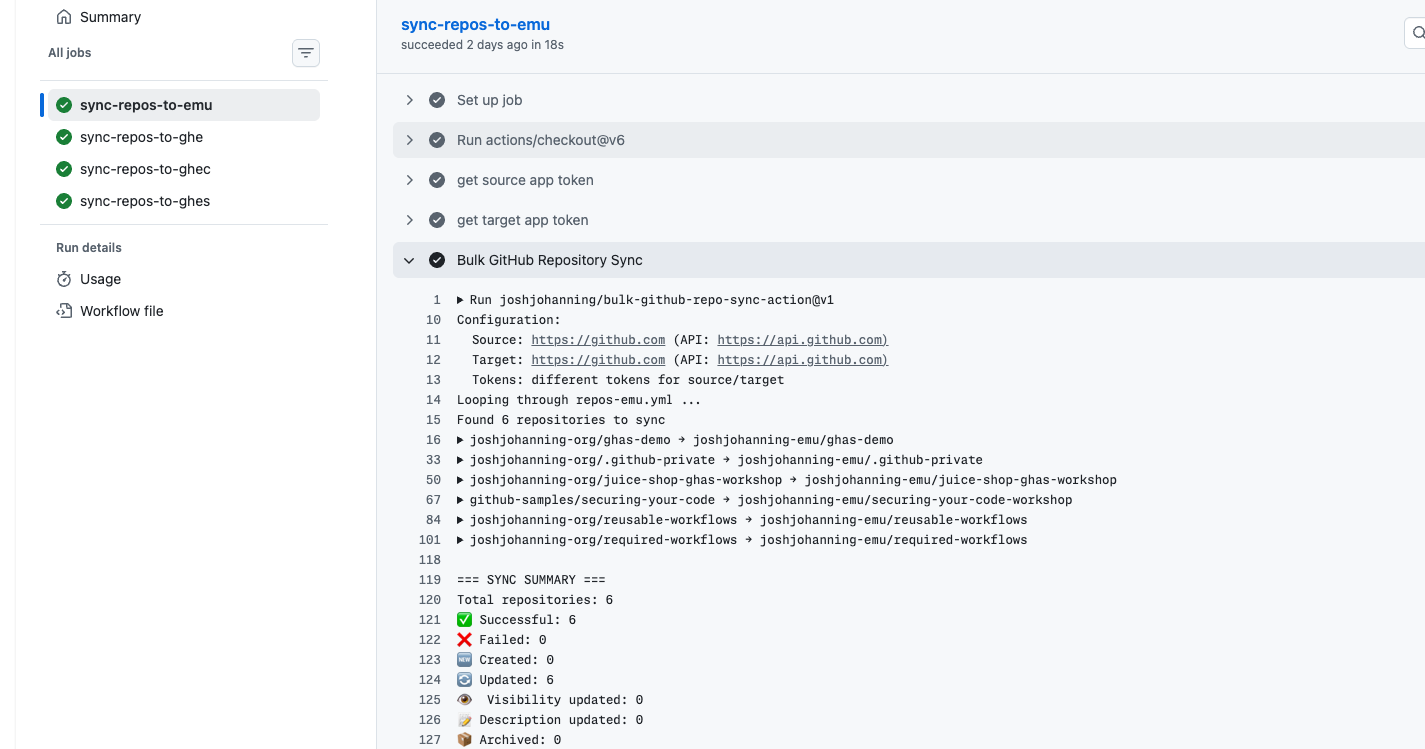
After each run, the action generates a summary:
1
2
3
4
5
6
7
8
9
=== SYNC SUMMARY ===
Total repositories: 6
✅ Successful: 6
❌ Failed: 0
🆕 Created: 0
🔄 Updated: 6
👁️  Visibility updated: 0
📝 Description updated: 0
📦 Archived: 0
Things to Keep in Mind
- Mirror cloning syncs all branches and tags - it’s a full copy of the repository
force-push: truewill overwrite the target repo’s history - use with caution ⚠️disable-github-actions: trueis the default as to not run CI on mirrored copies, but you can set it tofalseif you want to keep Actions enabled- Archiving is smart about unarchive/re-archive if you need to re-run the sync
- If
target-github-tokenis not provided, the action uses the source token (useful when syncing within the same GitHub instance) - The action auto-derives the instance URL from the API URL, so you don’t need to specify both
Summary
If you need to keep repositories in sync between GitHub environments - whether during a migration, for internal mirroring, or for controlling your dependency update cadence - the bulk-github-repo-sync-action can help. Set up a YAML file with your repo mappings, point it at your source and target, and let it run on a schedule.
Check out the action on the GitHub Marketplace and drop a comment here or open an issue if you have questions or feedback! Happy syncing! 🚀