Syncing GitHub Repository Settings and Files in Bulk with a GitHub Action
A GitHub Action to sync repository settings, configuration files, and workflows across multiple repositories using a simple YAML config or custom property filtering
Overview
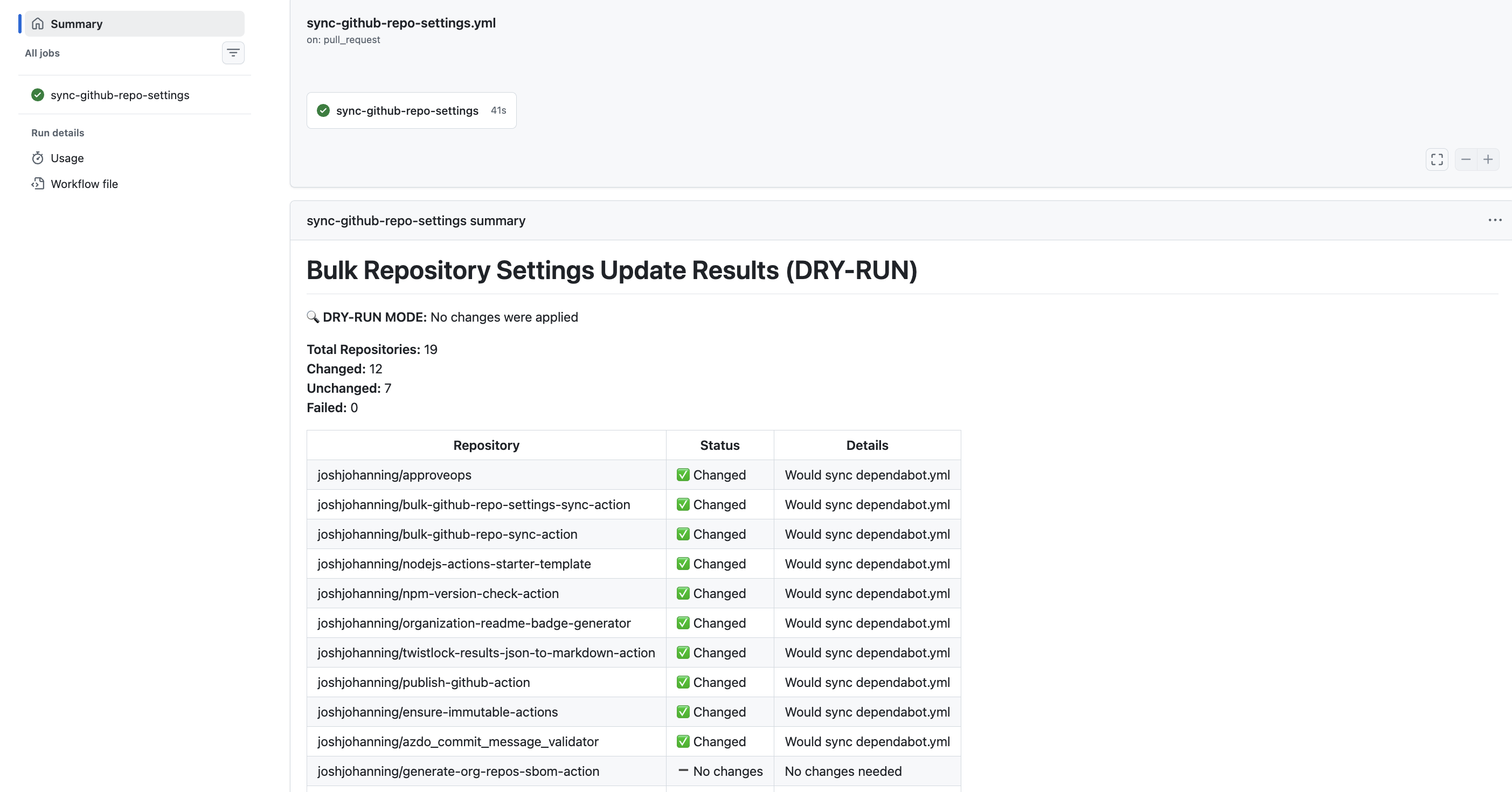
If you manage more than a handful of GitHub repositories, you know the pain of keeping settings consistent. Need to enable squash merging everywhere? Turn on secret scanning across the org? Sync your Dependabot config to 20 repos? Doing this manually is tedious and error-prone, and it only gets worse as your repository count grows and grows.
I built the bulk-github-repo-settings-sync-action (GitHub Marketplace) to solve this. It’s a GitHub Action that lets you declaratively manage repository settings and sync files like dependabot.yml, workflow files, Copilot instructions, CODEOWNERS, and more - all from a single configuration repository.
Think of it as a lightweight alternative to managing repository settings with Terraform. You get the same “configuration as code” benefits, but without needing to manage Terraform state or configure a provider. And unlike Terraform, this action can also sync files across repositories by automatically opening pull requests when updates are needed.
I use this action to keep my own open source actions repositories in sync. You can see it in action (pun intended) in my sync-github-repo-settings repository, which is both a working example and the actual configuration I use day-to-day. I’ve also recommended this approach to a few large enterprise customers I’ve worked with to help manage their GitHub adoption and keep repository configurations consistent as they scale.
For enterprises, this is a great way to set some baseline defaults across your organization - enable security features, standardize merge strategies, distribute common files - without requiring every team to manually configure each repository.
Features
Here’s what you can manage with the action as of the writing of this post (v1.15.2):
Repository Settings
- Merge strategies - Configure squash, merge commit, and rebase merge options
- Auto-merge - Enable or disable auto-merge on pull requests
- Branch deletion - Automatically delete head branches after merge
- Branch update suggestions - Always suggest updating pull request branches
- Code scanning - Enable default CodeQL code scanning setup
- Secret scanning - Enable secret scanning and push protection
- Dependabot - Enable Dependabot alerts and security updates
- Immutable releases - Prevent release deletion and modification
- Topics - Manage repository topics
File Syncing (via Pull Requests)
dependabot.yml- Sync Dependabot configuration- Workflow files - Sync one or more GitHub Actions workflow files
- Copilot instructions - Sync
copilot-instructions.mdfiles - CODEOWNERS - Sync CODEOWNERS files with template variable support
- Pull request templates - Sync PR templates
.gitignore- Sync.gitignorefiles (preserves repo-specific entries)package.json- Syncscriptsandenginesfields (useful for Node.js version upgrades)
Configuration Syncing (via API)
- Rulesets - Sync repository rulesets (with option to delete unmanaged rulesets)
- Autolink references - Sync autolinks to external systems (e.g., Jira, Azure DevOps)
Other Goodies
- Dry-run mode - Preview all changes without applying them (more on this below)
- Per-repository overrides - Override global settings for specific repos in YAML
- Custom property filtering - Dynamically target repos by organization custom properties
- Rules-based configuration - Define multiple rule sets with different selectors for different repo groups
- Change detection - Only makes changes (or opens PRs) when content actually differs
- Job summary - See exactly what changed, what was skipped, and what failed
Comparison with Other Tools
There are a few other approaches to managing repository settings at scale. Here’s how they compare:
| This Action | Terraform | safe-settings | |
|---|---|---|---|
| Setup | Add a workflow + YAML config | Terraform provider, state backend, HCL | Deploy a Probot app (Docker, Lambda, etc.) |
| Runs as | GitHub Actions workflow | CLI / CI pipeline | Probot app (webhook-driven or scheduled) |
| State management | Stateless (reads current state each run) | Requires state file management | Stateless (webhook + config-driven) |
| File syncing | Built-in (opens PRs for dependabot.yml, CODEOWNERS, etc.) | Not supported | Not supported |
| Drift prevention | Dry-run mode; re-run on schedule if needed | terraform plan | Real-time via webhooks (reverts unauthorized changes) |
| Config approach | YAML repo list or rules-based with custom properties | HCL files | Org/suborg/repo YAML hierarchy in an admin repo |
| Learning curve | YAML config + GitHub Actions | HCL, Terraform concepts | Probot concepts, YAML config, deployment |
safe-settings is a great option if you want real-time drift prevention (it listens for webhook events and can revert unauthorized changes immediately). It also has a deeper settings model with org/suborg/repo hierarchy, team management, environments, and custom validation rules.
My action is a better fit if you want something simpler to set up (just a workflow, no infrastructure to deploy) and you need file syncing - distributing dependabot.yml, workflow files, Copilot instructions, CODEOWNERS, etc. across repos via PRs. That’s something neither safe-settings nor Terraform can do.
Terraform is more powerful if you need full lifecycle management of GitHub resources (creating repos, managing teams, etc.), though it requires managing state. And safe-settings has deeper policy enforcement features, but requires deploying and maintaining infrastructure (Docker, Lambda, etc.).
Setting Up the Action
Prerequisites
- A GitHub App (recommended) or personal access token with
reposcope - A configuration repository to store your settings and config files
- Target repositories must be accessible by the token
Authentication
A GitHub App is recommended for better security and higher rate limits.
If you are new to GitHub Apps, check out my post on creating and using GitHub Apps! It’s really much easier than you think. 🚀
- Create a GitHub App with the following permissions:
- Repository Administration: Read and write
- Contents: Read and write (for file syncing)
- Pull Requests: Read and write (for file syncing)
- Install it on your organization/repositories
- Add
APP_IDandPRIVATE_KEYas repository secrets/variables
Workflow Setup
Here’s the actual workflow I use in my sync-github-repo-settings repository:
1
2
3
4
5
6
7
8
9
10
11
12
13
14
15
16
17
18
19
20
21
22
23
24
25
26
27
28
29
30
31
32
33
34
35
36
37
38
39
40
41
42
43
name: sync-github-repo-settings

on:
  push:
    branches: ['main']
  pull_request:
    branches: ['main']
  workflow_dispatch:

jobs:
  sync-github-repo-settings:
    runs-on: ubuntu-latest
    if: github.actor != 'dependabot[bot]'
    permissions:
      contents: read

    steps:
      - uses: actions/checkout@v6

      - uses: actions/create-github-app-token@v2
        id: app-token
        with:
          app-id: ${{ vars.APP_ID }}
          private-key: ${{ secrets.PRIVATE_KEY }}
          owner: ${{ github.repository_owner }}

      - name: Update Repository Settings
        uses: joshjohanning/bulk-github-repo-settings-sync-action@v1
        with:
          github-token: ${{ steps.app-token.outputs.token }}
          repositories-file: 'repos.yml'
          allow-squash-merge: true
          allow-merge-commit: false
          allow-rebase-merge: false
          allow-auto-merge: true
          delete-branch-on-merge: true
          allow-update-branch: true
          code-scanning: true
          secret-scanning: true
          secret-scanning-push-protection: true
          dependabot-alerts: true
          dependabot-security-updates: true
          dry-run: ${{ github.event_name == 'pull_request' }} # dry run if PR
Notice the
dry-runline - when a pull request is opened against the config repo, the action runs in dry-run mode so you can preview what would change. When merged tomain, it applies the changes for real. This is one of my favorite parts of the setup.
Repository Selection Methods
There are a couple of different ways you could approach selecting which repositories to manage.
Option 1: Repository List (repos.yml)
The simplest approach - list repositories explicitly in a YAML file. This supports per-repository setting overrides too.
1
2
3
4
5
6
7
8
9
10
11
12
13
14
15
16
17
18
19
20
21
22
23
24
25
26
27
28
29
30
31
32
33
34
35
36
repos:
  # node actions (javascript)
  - repo: joshjohanning/approveops
    topics: 'github,actions,javascript,node-action,approval,issueops,issue-ops'
    dependabot-yml: './config/dependabot/npm-actions.yml'
    rulesets-file: './config/rulesets/actions-ci.json'
    immutable-releases: true
    workflow-files:
      - ./config/workflows/ci.yml
      - ./config/workflows/publish.yml
    gitignore: './config/gitignore/.gitignore-actions'
    copilot-instructions-md: './config/copilot/copilot-instructions-actions.md'
    package-json-file: './config/package-json/package.json'

  - repo: joshjohanning/bulk-github-repo-settings-sync-action
    topics: 'github,actions,javascript,node-action'
    dependabot-yml: './config/dependabot/npm-actions.yml'
    rulesets-file: './config/rulesets/actions-ci.json'
    immutable-releases: true
    workflow-files:
      - ./config/workflows/ci.yml
      - ./config/workflows/publish.yml
    gitignore: './config/gitignore/.gitignore-actions'
    copilot-instructions-md: './config/copilot/copilot-instructions-actions.md'
    package-json-file: './config/package-json/package.json'

  # composite actions (shell)
  - repo: joshjohanning/actions-ref-linter
    topics: 'github,actions,shell,composite-action'
    dependabot-yml: './config/dependabot/actions.yml'

  # other repositories
  - repo: joshjohanning/sync-github-repo-settings
    topics: 'github,github-settings,settings-sync'
    dependabot-yml: './config/dependabot/actions.yml'
    gitignore: './config/gitignore/.gitignore-simple'
Each repo inherits the global settings from the workflow inputs (like allow-squash-merge: true), while per-repository overrides in the YAML take precedence. This lets you maintain a common baseline while customizing individual repos as needed.
Option 2: Rules-Based Configuration (settings-config.yml)
For larger organizations, you can define rules that dynamically target repositories using selectors like custom properties. When a repository matches multiple rules, settings are merged in order - later rules override earlier ones.
1
2
3
4
5
6
7
8
9
10
11
12
13
14
15
16
17
18
19
20
21
22
23
24
25
26
27
28
29
30
31
owner: my-org

rules:
  # Rule 1: Platform repos get strict security settings
  - selector:
      custom-property:
        name: team
        values: [platform]
    settings:
      code-scanning: true
      secret-scanning: true
      secret-scanning-push-protection: true
      immutable-releases: true
      dependabot-yml: './config/dependabot/npm-actions.yml'

  # Rule 2: Frontend and backend repos get monitoring
  - selector:
      custom-property:
        name: team
        values: [frontend, backend]
    settings:
      code-scanning: true
      secret-scanning: true

  # Rule 3: Specific repos get additional overrides
  - selector:
      repos:
        - my-org/special-repo
    settings:
      topics: 'special,monitored'
      dependabot-alerts: true
Custom properties are only available for GitHub organizations (not personal accounts) and must be configured at the organization level.
Other Selection Methods
You can also use:
- Comma-separated list:
repositories: 'owner/repo1,owner/repo2' - All org repos:
repositories: 'all'withowner: 'my-org' - Custom property filtering (as action inputs):
custom-property-nameandcustom-property-valuewithowner
My Configuration Repository Structure
To give you a sense of what a real configuration looks like, here’s the file structure of my sync-github-repo-settings repository:
1
2
3
4
5
6
7
8
9
10
11
12
13
14
15
16
17
18
19
20
21
22
23
24
├── .github/
│   └── workflows/
│       └── sync-github-repo-settings.yml
├── config/
│   ├── copilot/
│   │   └── copilot-instructions-actions.md
│   ├── dependabot/
│   │   ├── actions.yml
│   │   ├── npm-actions.yml
│   │   └── npm-actions-no-octokit.yml
│   ├── gitignore/
│   │   ├── .gitignore-actions
│   │   ├── .gitignore-js
│   │   └── .gitignore-simple
│   ├── package-json/
│   │   └── package.json
│   ├── pull-request-templates/
│   │   └── pull_request_template.md
│   ├── rulesets/
│   │   └── actions-ci.json
│   └── workflows/
│       ├── ci.yml
│       └── publish.yml
└── repos.yml
The config/ directory contains all the files I want to sync across my repositories. Different repos can reference different config files - for example, my JavaScript actions use npm-actions.yml for Dependabot while my shell-based composite actions use a simpler actions.yml.
Dry-Run Mode
This is probably my favorite feature. When dry-run mode is enabled, the action previews all changes without applying them and generates a job summary showing exactly what would happen:
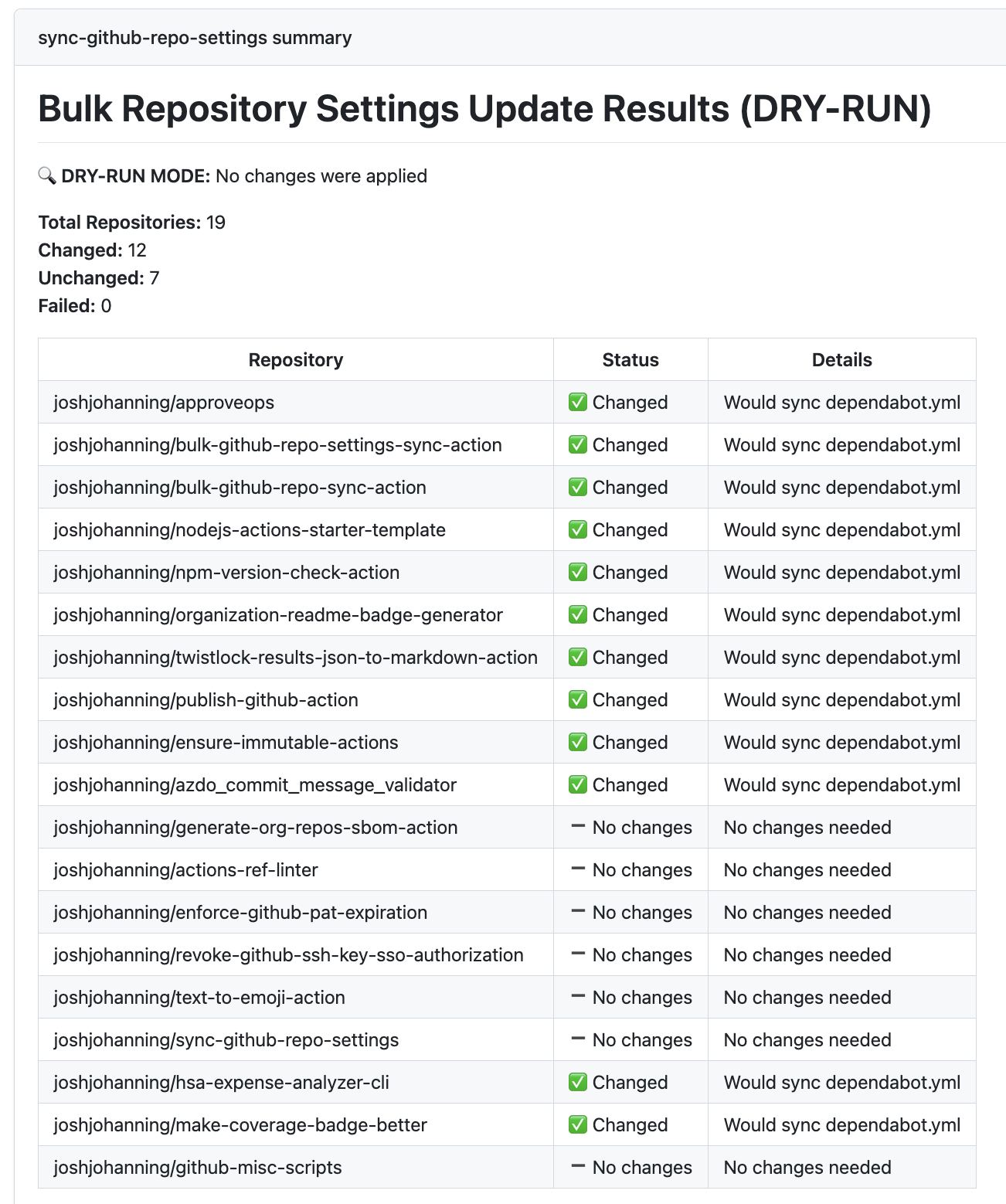
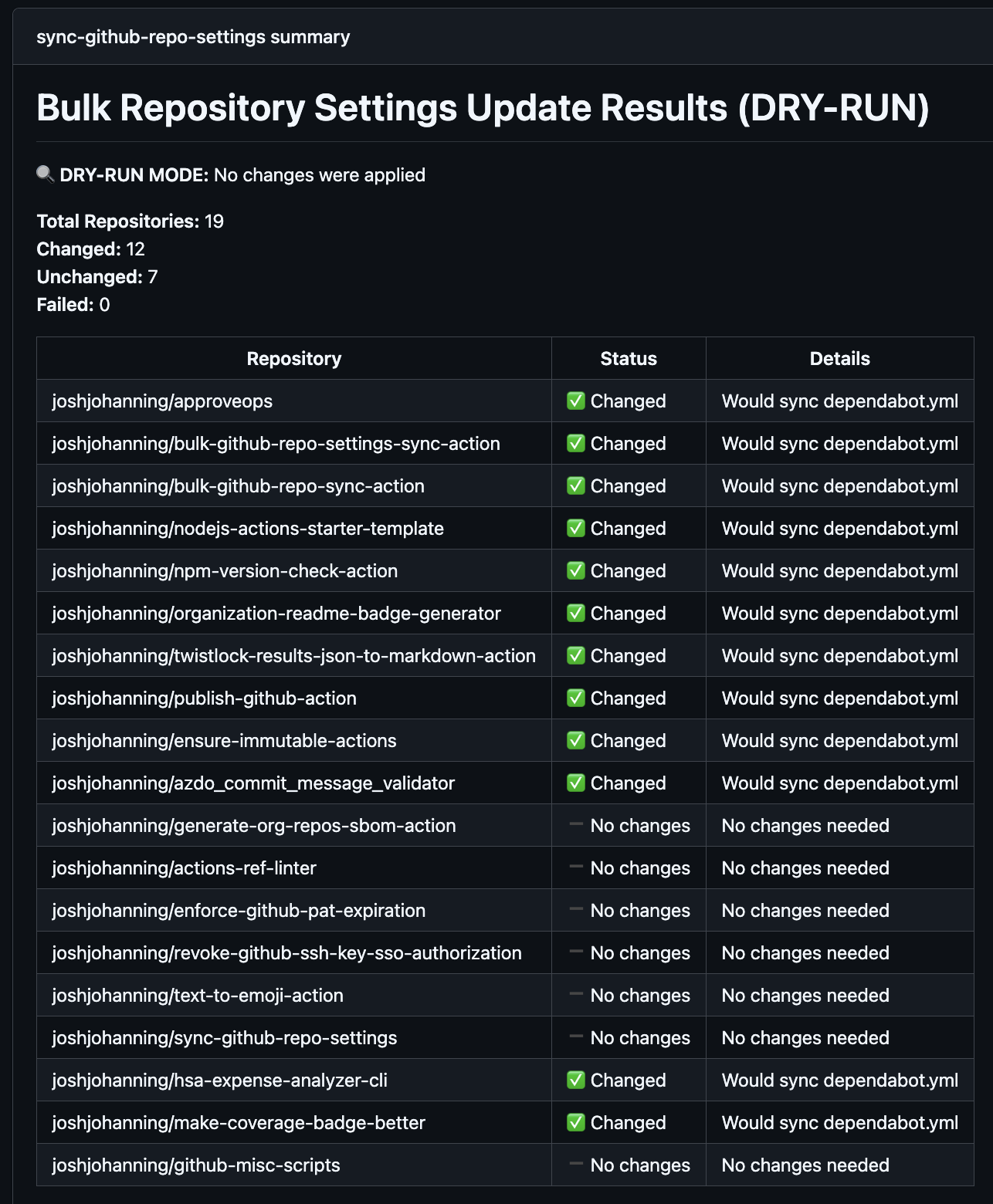 Dry-run mode job summary showing changed vs. unchanged repositories
The dry-run output shows which repositories would have settings changes (including before/after values), which repos would receive file sync PRs, which are already up to date, and a summary table with changed/unchanged/failed counts.
I use this pattern in my workflow:
1
dry-run: ${{ github.event_name == 'pull_request' }}
This means any pull request to the config repo automatically runs a dry-run so I can review the impact before merging. Once merged to main, the real changes are applied. Pretty handy!
File Syncing Behavior
When the action syncs files (like dependabot.yml, workflows, or Copilot instructions), the behavior is pretty straightforward:
- File doesn’t exist in the target repo - creates the file and opens a PR
- File exists but differs - updates the file via PR
- File is identical - no PR is created (skipped)
- Open PR already exists - updates the existing PR branch if the source content has changed
All PRs are created using the GitHub API, so commits show as verified. Multiple workflow files are bundled into a single PR per repository to reduce noise.
.gitignore Preservation
The .gitignore syncing preserves repository-specific entries, which I think is really useful. If a target repo’s .gitignore has a section after the marker # Repository-specific entries (preserved during sync), those entries are kept intact during syncs. This lets you maintain a standard base .gitignore while still allowing repos to add their own ignores.
CODEOWNERS Template Variables
CODEOWNERS files support template variables using {{variable_name}} syntax, allowing you to use a single template file while assigning different teams per repository. This is especially useful with rules-based configuration where teams are automatically assigned based on custom properties.
Limitations & Notes
A few things to keep in mind:
- Topics replace all existing repository topics (they don’t merge)
- Autolink references are synced directly via API - autolinks not in the config file are deleted from the repo
- Rulesets are identified by name - if you rename a ruleset, use
delete-unmanaged-rulesets: trueto clean up the old one - CodeQL scanning may not be available for all repository languages
- Failed updates are logged as warnings but don’t fail the action
- Access denied repositories are skipped with warnings - make sure your GitHub App is installed on all target repositories
Summary
Keeping repository settings and files consistent across many repositories doesn’t have to be tedious. The bulk-github-repo-settings-sync-action gives you a version-controlled approach to keeping your repositories consistent, whether you’re an open source maintainer keeping a dozen actions repos in sync or an enterprise team standardizing settings across hundreds of repositories.
Check out the action on the GitHub Marketplace, browse my working configuration repo, and drop a comment here or open an issue if you have questions or feature ideas! Happy syncing! 🚀