Azure Federated Credentials: Using Claims Matching Expressions with GitHub Actions OIDC
Using the new claims matching expression feature in Azure federated credentials to use wildcards with GitHub Actions OIDC subject claims
Overview
In a previous post, I covered how to use OIDC with reusable workflows in GitHub Actions to securely access cloud resources like Azure. One of the pain points I mentioned was that Azure required an exact match on the subject identifier when configuring federated credentials - meaning no wildcards. If you wanted to match multiple repositories, branches, or tags, you had to create a separate federated credential for each combination, and you’re limited to 20 per app registration.
AWS has supported wildcards for a while, but Azure was lagging behind. Not anymore! With the new Claims matching expression feature (currently in Preview), Azure now supports wildcard-like expressions in federated credentials.
Claims Matching Expressions
Instead of selecting “Explicit subject identifier” when creating a federated credential, you can now select “Claims matching expression (Preview)” and use the matches operator with * wildcards.
For example, instead of creating individual federated credentials for each repository, you can use an expression like:
1
claims['sub'] matches 'repo:my-org/*:ref:refs/heads/main'
This would match the sub claim for any repository in the my-org organization on the main branch.
Wildcard Patterns
You can use wildcards in different parts of the expression to match various patterns:
| Expression | Matches |
|---|---|
claims['sub'] matches 'repo:my-org/*:*' | Any repo in my-org, any ref |
claims['sub'] matches 'repo:my-org/*:ref:refs/heads/main' | Any repo in my-org, but only the main branch |
claims['sub'] matches 'job_workflow_ref:my-org/reusable-workflows/.github/workflows/deploy.yml@refs/tags/v*' | The specific reusable workflow, but any v tag (e.g., v1, v2, etc.) |
That last example is particularly useful when combined with customized OIDC subject claims and reusable workflows. You can use a single federated credential to match multiple tags of a reusable workflow instead of having to update the credential each time you release a new version.
Using Repository Custom Properties
Expressions aren’t limited to the sub claim, either. GitHub Actions OIDC tokens now support repository custom properties as claims, prefixed with repo_property_. This lets you match on repository metadata without needing to list repos individually:
| Expression | Matches |
|---|---|
claims['repo_property_team'] == 'platform' | Any repo with the team custom property set to platform |
claims['repo_property_data_classification'] == 'strict' && claims['sub'] matches 'repo:my-org/*:*' | Any repo in my-org with the data_classification custom property set to strict |
Configuring in Azure
To configure a claims matching expression in Azure:
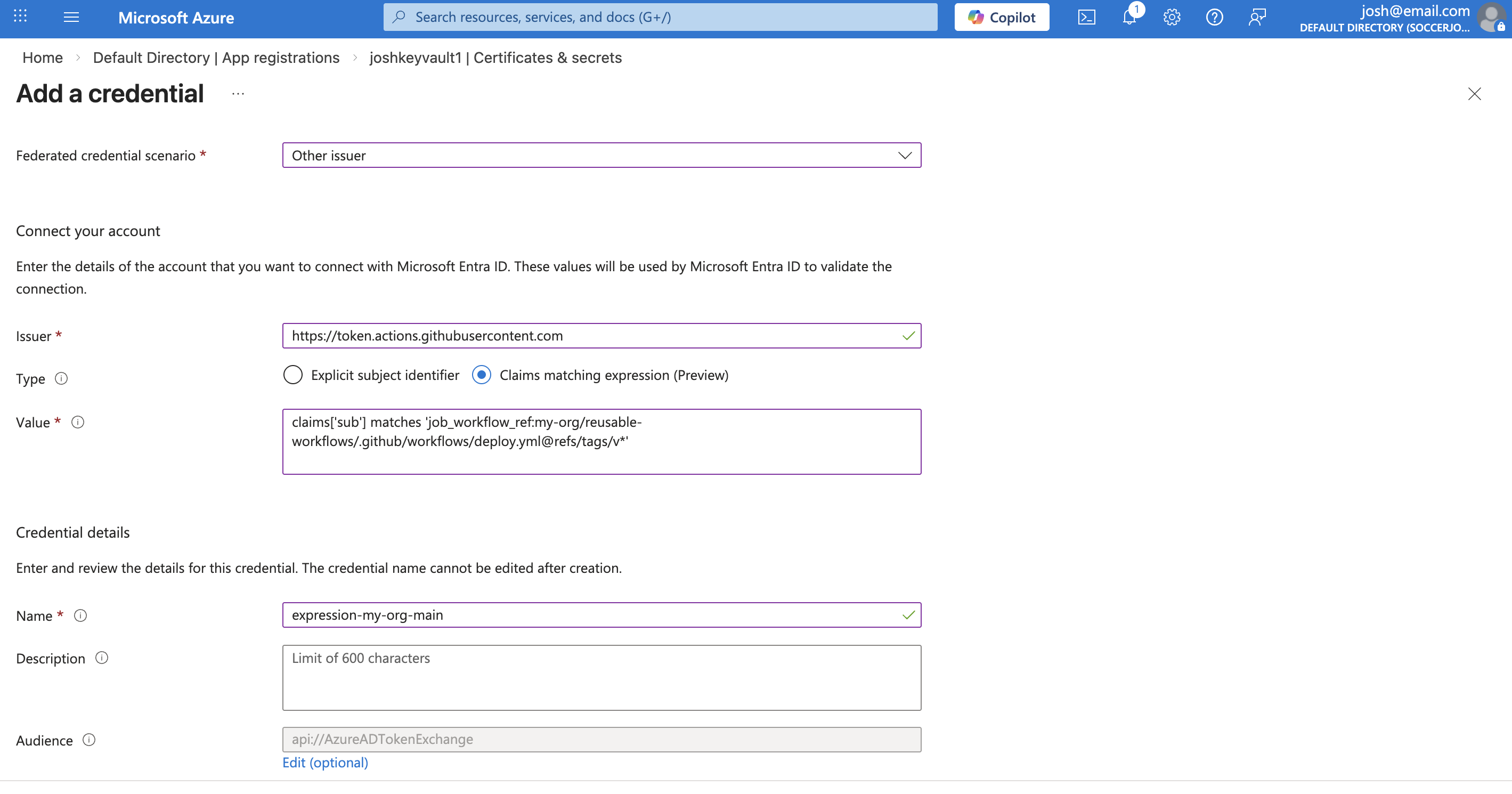
- In Entra ID, navigate to the app registration and go to “Certificates & secrets” > “Federated credentials”
- Select “Other issuer” as the federated credential scenario
- For the issuer, use:
https://token.actions.githubusercontent.com - For the type, select “Claims matching expression (Preview)” instead of “Explicit subject identifier”
- For the value, enter your expression, such as:
1
 claims['sub'] matches 'job_workflow_ref:my-org/reusable-workflows/.github/workflows/azure-oidc-sample.yml@refs/tags/v*'
- It should look something like this:
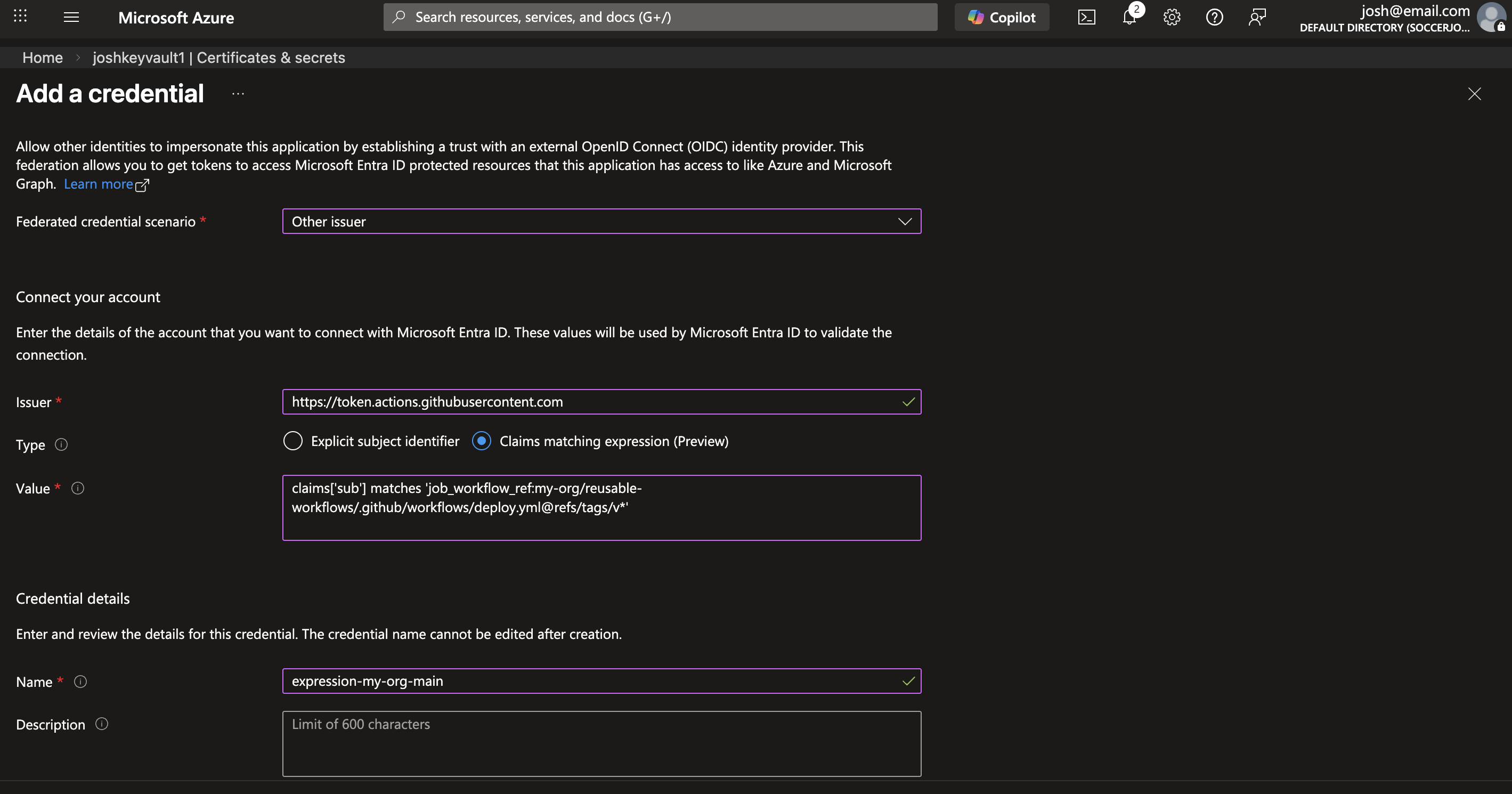 Configuring a claims matching expression in Azure for a federated credential
The claims matching expression feature is currently in Preview. See the Microsoft docs for the latest information and supported syntax.
Use IDs Instead of Names for Extra Security
When using wildcards in claims matching expressions, consider using IDs instead of names for organizations and repositories. Org and repo names can be renamed - and if someone claims an abandoned name, they could impersonate the original OIDC subject. This is especially relevant when using broad wildcard patterns like repo:my-org/*:*.
GitHub’s OIDC token includes ID-based claims like repository_id, repository_owner_id, and others. You can customize the subject claim to include these ID-based claims instead of (or in addition to) name-based ones. For example, using @tspascoal’s gh-oidc-sub gh CLI extension:
1
gh oidc-sub set --repo my-org/my-repo --subs "repository_owner_id,repository_id"
This would produce a subject claim like:
1
"sub": "repository_owner_id:106885989:repository_id:561484078"
Then in Azure, you can use a claims matching expression with the IDs:
1
claims['sub'] matches 'repository_owner_id:106885989:*'
Since IDs are immutable and don’t change when an org or repo is renamed, this avoids the rename/name-squatting problem entirely.
Using ID-based claims like
repository_owner_idandrepository_idinstead of name-based ones (e.g.,repo:my-org/*:*) eliminates the risk of someone claiming an abandoned org/repo name and matching your federated credential.
Summary
I’ve been wanting wildcards in Azure federated credentials for a long time, so it’s nice to finally see this available (even if it’s still in Preview). Combined with the 20 federated credential limit per app registration, this makes managing OIDC at scale much more practical - especially if you’re using reusable workflows with customized subject claims. And if you’re going the wildcard route, definitely consider using ID-based claims (repository_owner_id, repository_id) instead of names to avoid any potential rename/graveyard attacks. ✨